RPG Audio Vault Bundle
2D > Textures > Miscellaneous
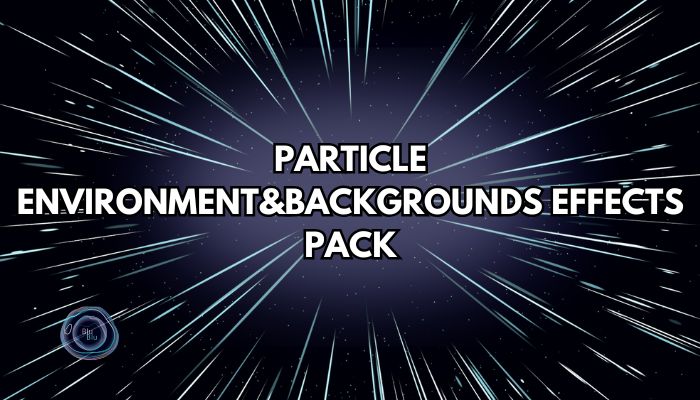
This Particle Effects Pack includes 40+ customizable effects perfect for enhancing environments and UI in 2D games. From weather FX (snow, rain, wind) to magical orbs, bubbles, and sparkling stars—ideal for fantasy, casual, platformers, metroidvanias and adventure games.
Great for in-game environments, menus, or loading screens.
Works on PC and mobile.
List of VFXs included:
Environment:
Blizzard wind FX
Bubbles FX
Bubbles 2 FX
Bubbles 3 FX
Bubbles geyser FX
Bubbles geyser 2 FX
Clouds FX
Fallin snow side FX
Falling autumn leaves FX
Falling leaves FX
Falling snow FX
Falling cherry blossom petals FX
Falling petals FX
Falling snowflakes 1 FX
Floating orbs fireflies FX
Floating orbs FX
Fog FX
Fog 2 FX
Rain FX
Rain 2 FX
Rainbow Bubbles FX
Snowflakes 1 FX
Snowflakes with snow FX
Flying up bats FX
Flying up bats FX 2 Flying up birds FX Flying up birds FX VariantBackground:
Floating big dots FX
Floating orbs Variant FX
Floating stars FX
Hearts flyin up FX
Hearts outline flyin up FX
Hearts white base flyin up FX 2
Lights flying up FX
Stars FX
Stars flying up 1 FX
Stars outline flying up FX
Stars white base flying up FX
Speed lines FX
Speed lines 2 FX
Speed lines Variation FX
Speed lines with dots FX
Sparkling Particle Background FX
Space dots FX
Space stars box FX
Rainbow magic whirl Y axis FX
Magic whirl Y axis FX
Other:
Bubbles pause and catchup FX
Dots FX
Flame FX
Sparkles FX
Glow FX
Round big glow Variant FX
Sparkles with glow FX
Sparkles hexagones FX
Sparkles stars FX
Sparkles hearts FX
If you see pink squares instead of the scene/prefab particle effects, it means:
You've selected the wrong project type (the correct one is Universal 2D).
A sprite is missing – go to the prefab → Renderer → in the "Material" field, you'll see missing sprite info. Click the dot next to it and choose a material with a matching name to the particle system.
Open your Unity project.
Launch Unity Hub → pick the project where you want to install the assets or create new project.
Drag & drop the .unitypackage file into the Unity Editor.
Drop it anywhere inside the Project window or directly into the Editor view.
Unity will automatically open the Import Unity Package window.
Select the files to import.
Recommended: leave all items checked.
Click Import.
Wait for Unity to process the files.
Assets will appear inside your Project panel, usually inside a folder named after the package.

This asset has not received any reviews yet.
You must be logged in and have bought this asset to leave a review.
Great news! All assets on GameDev Market come with our standard Pro Licence.
Whereas some asset stores have multiple licence versions, we believe having only one licence keeps things as simple as possible for our users, so that you can keep on doing what you love without any doubts over where and how you can use your assets.
At a glance, here are some of the key points from the licence:
You can:
You cannot:
You can check out the full Pro Licence here.
Great news! All assets on GameDev Market come with our standard Pro Licence.
Whereas some asset stores have multiple licence versions, we believe having only one licence keeps things as simple as possible for our users, so that you can keep on doing what you love without any doubts over where and how you can use your assets.
At a glance, here are some of the key points from the licence:
Please login/signup to add this product to your wishlist.
| Name | Value |
|---|---|
| Version | 1.2 |
| Last updated | December 30, 2025 |
| Included formats | .png, .unitypackage |
| Created in | Unity |
| File size | 48.07 MB |
| Changelog | Version 1.2 Added new particles: Flying up bats FX Flying up bats FX 2 Flying up birds FX Flying up birds FX Variant |
| Vector | |
| Layered | |
| Sprite | |
| Allows usage with AI? |
No
The creator has specified that this asset is not to be used for the purpose of any type of AI training.
|
| Name | Value |
|---|---|
| Version | 1.2 |
| Last updated | December 30, 2025 |
| Included formats | .png, .unitypackage |
| Created in | Unity |
| File size | 48.07 MB |
| Changelog | Version 1.2 Added new particles: Flying up bats FX Flying up bats FX 2 Flying up birds FX Flying up birds FX Variant |
| Vector | |
| Layered | |
| Sprite | |
| Allows usage with AI? |
No
The creator has specified that this asset is not to be used for the purpose of any type of AI training.
|
*You will receive an email once per week when any Followed Creators list new assets
Log in and Share this asset and your Alliance link will be included, meaning you will earn money back on any sales/purchases made by new members joining through your link! See the Referral Guide for more details.
GameDev Market is a marketplace for high quality, affordable game assets handcrafted by talented creators from all around the world.
GameDev Network Limited is registered in England & Wales (08951892). Registered office: Baltic Co-Working Space, 12 Jordan Street, Liverpool, UK. L1 0BP. ICO registered (ZA122213).
© 2026 GameDev Network Limited. All rights reserved.
Be the first to leave a comment.